


- Posts: 1
- Thank you received: 0
ProviewR 6.1.5 first run problem on Kubuntu 24.04
4 months 6 days ago #346
by Dimby
ProviewR 6.1.5 first run problem on Kubuntu 24.04 was created by Dimby
Hello everyone,
Having been a ProviewR user since v5.5, I've upgraded my system to Kubuntu 24.04 and I'm trying to run the Demo for the v6.1.5 version.
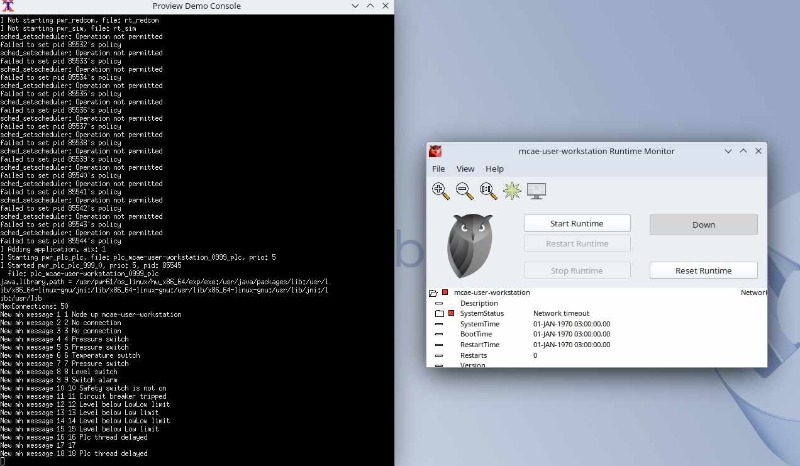
However, I am unable to start the runtime (the output is in the image file). I already set the user pwrp as an administrator.
Need help please
/Dimby
Having been a ProviewR user since v5.5, I've upgraded my system to Kubuntu 24.04 and I'm trying to run the Demo for the v6.1.5 version.
However, I am unable to start the runtime (the output is in the image file). I already set the user pwrp as an administrator.
Need help please
/Dimby
Please Log in or Create an account to join the conversation.


4 months 2 days ago #347
by claes
Replied by claes on topic ProviewR 6.1.5 first run problem on Kubuntu 24.04
Hi Dimby,
If I look at the output It looks as if everything is running, and it’s probably the communication with the runtime monitor that is not working correctly. The protocol was changed recently. You can try to start from a terminal window instead.
Attach the pwrdemo61 project
> sdf pwrdemo61
Start ProviewR runtime (you might have to reset with 'source pwr_stop.sh' first)
> rt_ini &
Start operator
> rt_xtt op &
Stop and reset runtime
> source pwr_stop.sh
/Claes
If I look at the output It looks as if everything is running, and it’s probably the communication with the runtime monitor that is not working correctly. The protocol was changed recently. You can try to start from a terminal window instead.
Attach the pwrdemo61 project
> sdf pwrdemo61
Start ProviewR runtime (you might have to reset with 'source pwr_stop.sh' first)
> rt_ini &
Start operator
> rt_xtt op &
Stop and reset runtime
> source pwr_stop.sh
/Claes
Please Log in or Create an account to join the conversation.
Time to create page: 0.457 seconds